
CRM integration · Virginia
CRM Integration Services in Virginia
The goal is simple. Every lead lands in one place, gets to the right person, and gets a follow-up, without anyone copying data by hand.
50+
projects delivered
30+
happy clients
6+
years in business
VA
office in Brambleton
Our approach
A CRM consultant in Virginia for teams that outgrew spreadsheets
Most CRMs we’re asked to fix were bought with good intentions and then left half set up. Contacts are duplicated, deal stages mean different things to different reps, and website leads arrive by email instead of landing in the pipeline.
We start by agreeing how your sales process actually works, then set up the CRM to match it and connect every place leads come from.
That might mean a short workshop with your sales lead, a look at a few real deals from last quarter, and an honest review of which fields and stages nobody actually uses.
Signs your CRM needs work
-
Reps keep their own spreadsheets on the side -
Website and phone leads don’t show up automatically -
Nobody trusts the pipeline report -
Follow-ups depend on someone remembering
Services
CRM integration services in Virginia
HubSpot Implementation
Portal setup, pipelines, properties, workflows and team onboarding.
Zoho CRM Setup
Modules, layouts, blueprints and automations configured for your process.
CRM Data Migration
Contacts, deals, notes and history moved from your old CRM or spreadsheets.
CRM Customization
Custom objects, fields, views and dashboards that fit how you sell.
Lead Routing and Follow-Up
Leads assigned to the right rep with automatic follow-up sequences.
AI CRM Integration
Lead scoring, email drafts and call summaries generated inside the CRM.
Website, Form and Stripe Integration
WordPress forms, chat and Stripe payments flowing straight into records.
Help Desk Integration
Zendesk or Freshdesk connected to HubSpot so sales sees every ticket.
HubSpot
HubSpot implementation and onboarding in Virginia
Then we train your team, because a CRM only works if people use it. If HubSpot isn’t the right fit, we’ll tell you and suggest Zoho or another option. As a HubSpot developer in Virginia, we can also build custom objects and integrations when the standard setup isn’t enough.
For teams that already use HubSpot, we often start with an audit instead, fixing the properties, workflows and permissions that grew messy over time.
Priorities
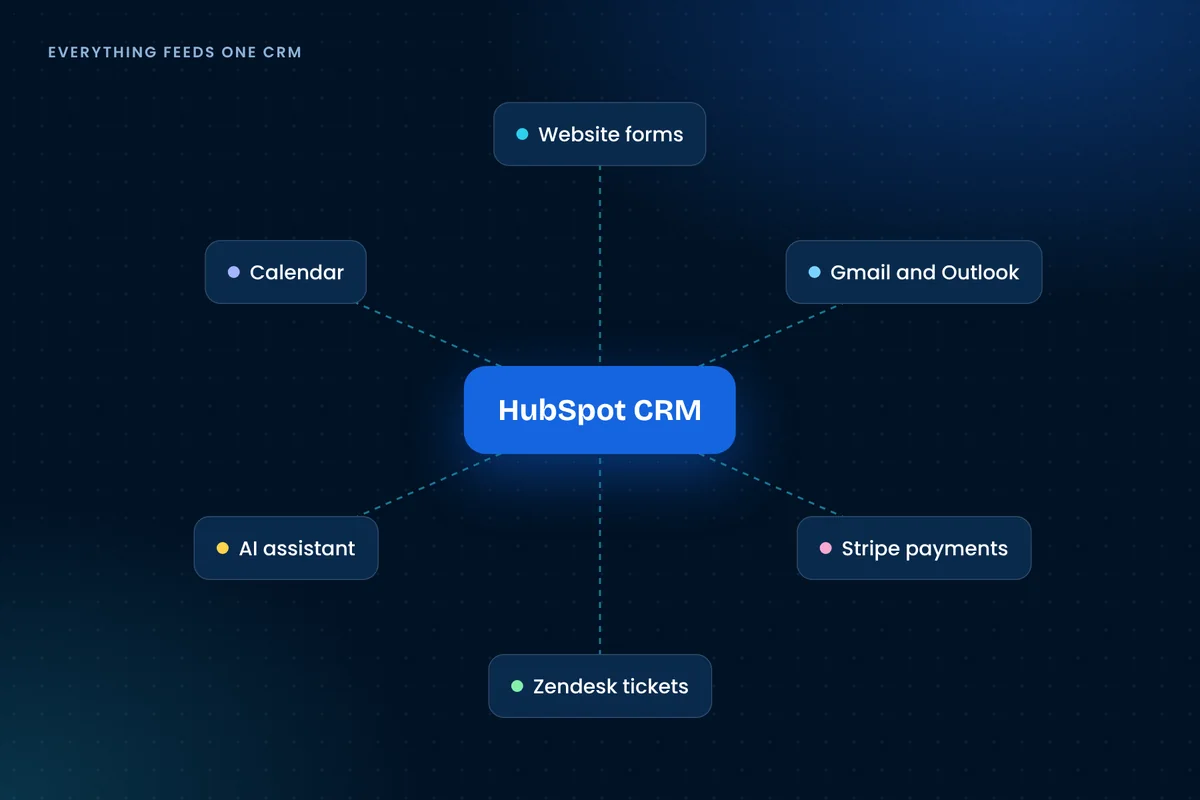
Which CRM integrations to set up first
Each step below builds on the one before it. Once forms, email and payments all land in the CRM, your reports start to reflect reality, and that makes every later improvement
easier to measure.
For a growing Virginia company, this order usually gives the fastest payoff.
-
Website forms and live chat into the CRM
-
Email and calendar sync for every rep
-
Payments from Stripe or your invoicing tool
-
Support tickets from Zendesk or Freshdesk
-
AI scoring and follow-up drafts once the data is clean
Automation
CRM automation in Virginia: lead routing and follow-up
Speed matters with inbound leads. A homeowner in Sterling who fills out three quote forms usually goes with whoever calls back first. We set up rules that assign each lead by service, territory or source the moment it arrives, then start a follow-up sequence if nobody responds.
Managers get alerts for leads that sit too long, and reps see a clear task list every morning instead of hunting through their inbox.
We also make sure every automated email sounds like your team wrote it, and that reps
can pause a sequence the moment a real conversation starts.
Data cleanup
Cleaning up messy CRM data
Messy data is the main reason teams stop trusting their CRM. We merge duplicates, standardize company names and phone formats, fill missing fields where we can, archive dead records, and set validation rules so the mess doesn’t come back.
If you’re moving to a new CRM, we clean the data before migration rather than carrying old problems into a new system.
We also agree on simple rules with your team, such as who owns a contact, when a deal moves stages and which fields are required, so the data stays useful after we hand it back.
Priorities
Why Virginia businesses choose Algorithm Zero for CRM integration
We also build the websites, help desks and automations that feed your CRM. That means we can fix a broken form, a missing field and a stuck workflow in the same afternoon, without three vendors pointing at each other.
-
One team in Brambleton for web, apps, automation, SEO, CRM and support tools
-
A written scope and quote before any work starts
-
You own every account, domain, code repository and login
-
Plain-English updates every week, with a named contact
-
Support after launch, so you are never left with a half-finished system
AI in your CRM
AI CRM integration for Virginia sales teams
Once your data is clean, AI inside the CRM starts paying off. It can score new leads based on what your best customers looked like, draft follow-up emails for reps to review, summarize calls and meetings into notes, and flag deals that have gone quiet.
We set it up inside the tools your team already uses, so nobody needs to learn a new app.
We start small, usually with call summaries or follow-up drafts, so your team can see the time it saves before anything runs on its own.
Who it’s for
CRM setups for Virginia industries
Pipelines and fields look different in every business, so we build around how yours actually sells.
Home services
Lead sources, estimate stages, job booking and review requests after completion.
Professional services
Intake, conflict checks, engagement stages and renewal reminders.
Healthcare and dental
Patient inquiries, consultation stages and follow-up sequences, kept separate from clinical records.
B2B and SaaS
Lifecycle stages, deal pipelines, trials, renewals and expansion opportunities.
Real estate
Buyer and seller pipelines, showing schedules and long-term nurture sequences.
Nonprofits
Donor records, campaigns, events and volunteer tracking.
Service areas
CRM consulting across Loudoun County and Virginia
We’re in Brambleton, so a CRM workshop with your team in Ashburn, Leesburg, Sterling or Reston is easy to arrange. Clients elsewhere in Virginia work with us over screen share.
Training sessions can be run on site for your whole team or recorded so new hires can watch them later
Northern Virginia
Across Virginia
Office: 42481 Rockrose Sq, Unit 102, Brambleton, VA 20148
How it works
How a CRM project runs
Step 1
Review
We look at your current CRM, data and sales process on a free call.
Step 2
Design
We map pipelines, fields, automations and integrations on paper first.
Step 3
Build and migrate
We configure the CRM, connect your tools and move your data.
Step 4
Train and support
Your team gets hands-on training and a contact for questions.
“Great communication, great skills, project finished ahead of schedule.”
Emanuel Rudas, Algorithm Zero client. More reviews on Clutch and Trustpilot.
FAQ
CRM integration questions from Virginia businesses
Straight answers to the questions Virginia business owners ask us most.
Which Virginia agencies offer HubSpot CRM implementation and integration?
We do, from our office in Brambleton. That includes setup, data migration, integrations with your website and tools, and team training.
How much does CRM integration cost for a small business in Northern Virginia?
It depends on the CRM, how many tools need connecting and how much data needs cleaning or migrating. We send a written quote after a free consultation.
Can you automate lead routing and follow-up inside HubSpot?
Yes. We set up rules that assign leads by territory, service or source, then trigger followup emails, tasks and reminders automatically.
Can you migrate my data into a new CRM?
Yes. We move contacts, companies, deals, notes and history, clean it on the way, and check the results with you before switching over.
How do I integrate my website, email and support tool with a CRM?
Usually through native integrations, with Zapier, Make.com or n8n filling any gaps. We map what data should flow where, then connect and test each link.
Do you integrate Zendesk or Freshdesk with HubSpot?
Yes, so sales and support see the same customer history and tickets show up on contact records.
Do you offer a free consultation?
Yes. The first call is free and comes with honest advice about whether your current CRM can be fixed or should be replaced.
Should we use HubSpot or Zoho CRM?
HubSpot is easier to adopt and has strong marketing tools, which suits most small and mid-sized teams. Zoho costs less per user and is very customizable. We'll recommend one after looking at your process, team size and budget.
Can AI be added to the CRM we already have?
Usually, yes. HubSpot and Zoho both have AI features, and where they fall short we connect outside AI tools through n8n, Make.com or the CRM's API.
Do you offer CRM support after setup?
Yes. Many clients keep us on a small monthly plan for new fields, reports, automations and help when someone gets stuck.
How long does a CRM implementation take?
A straightforward HubSpot or Zoho setup for a small team often takes two to four weeks. Projects with large data migrations or many integrations take longer, and we give you a timeline with the quote.
Will our team need training?
Yes, and it's included. We run hands-on sessions for each role, from sales reps to managers, and record them so new hires can catch up later. A CRM that people don't understand quickly falls back into spreadsheets.
Free quote, no obligation
Get a CRM your team actually uses
Book a free CRM review. We’ll look at your setup and tell you what to fix first.
Bring a few examples of where leads or data get lost today. We’ll show you how they could flow instead, and what it would take to get there.