Most small businesses lose hours every week to work a tool could do, like copying leads into a CRM, sending the same onboarding emails and building reports by hand.
Workflow automation tools take over that work, but choosing the wrong one wastes time and money.
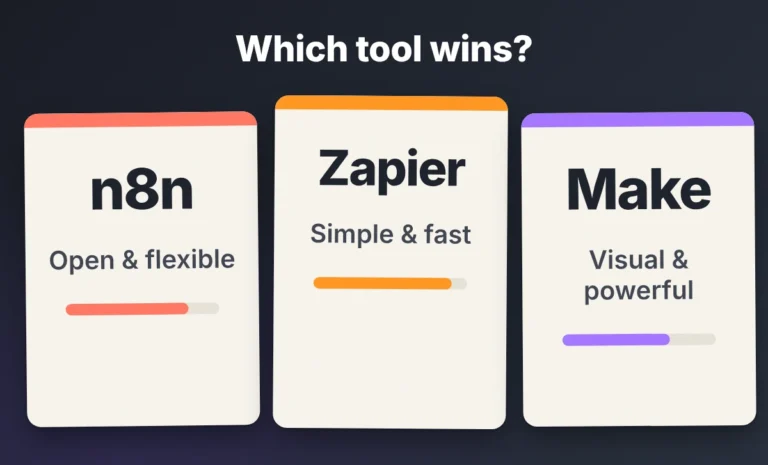
The short answer: Zapier is the best starting point for most small businesses. Make is better when your workflows are data-heavy and you like building visually. n8n is best when you have technical help and want full control, including self-hosting.
The right pick depends on your budget, who will manage it and what you want to automate first.
In this guide, we cover what matters when a small business chooses an automation tool:
- What workflow automation does for a small business and what to automate first
- How to choose by budget, skills and workflow complexity
- The best tools for lead generation, CRM updates, onboarding and sales pipelines
- No-code vs self-hosted automation
- Common mistakes and how to start
Quick answer: which tool fits your business?
| Tool | Best for | Ease of use | How it bills | Watch out for |
|---|---|---|---|---|
| Zapier | Beginners and simple app-to-app automations | Easiest | Per task (each successful action step) | Costs climb with multi-step, high-volume workflows |
| Make | Visual builders and data-heavy workflows | Moderate | Per operation (each module that runs) | Loops can use up operations quickly |
| n8n | Technical teams, API-heavy work and self-hosting | Hardest | Per workflow execution | Needs technical skill, and self-hosting needs maintenance |
| Your CRM’s built-in automations | Simple tasks inside one app | Easy | Often part of your CRM plan | Limited to that one app |
Key takeaways
- Best for most small businesses: Zapier, because it is the fastest to learn and connects to the most apps.
- Best for data-heavy workflows: Make.
- Best with technical help: n8n, especially for API-heavy workflows and self-hosting.
- Start small: automate one task that eats time every week, such as lead capture into your CRM.
- Budget: match the tool’s billing model to how many steps your workflows have and how often they run.
- Check built-in options first: your CRM or store may already automate simple tasks for free.
- Biggest mistake: automating a messy process, or building too many workflows before the first one works.
What is workflow automation for a small business?
Workflow automation uses software to move data and trigger actions between your apps, so your team does not repeat the same steps by hand.
A trigger starts the workflow, such as a new form submission or a paid invoice.
Then a series of steps runs on its own, like creating a contact, sending an email and posting a message to your team.
You set it up once, and it runs every time the trigger happens.
For a small team, that means faster replies to leads, fewer copy-paste errors and more time for work that needs a person.
In short: automation handles the repeatable steps so your team can focus on customers.
What should a small business automate first?
Start with repetitive administrative tasks that follow the same steps every time and happen often.
Good first candidates include:
- Sending new website leads to your CRM
- Sending a welcome email when someone signs up or becomes a client
- Creating tasks and reminders when a deal moves to a new stage
- Posting new orders or form submissions to Slack or email
- Collecting numbers into a weekly report
Leave out anything that changes every time or needs judgment, at least at first.
In short: automate the boring, repeatable task that costs you the most time each week.
Which automation tool is best for a small business?
Zapier is the best choice for most small businesses, with Make as the best step up for data-heavy workflows and n8n for teams with technical skills.
- Zapier: the simplest to learn, with the largest app catalog
- Make: a visual builder with strong tools for looping through and reshaping data
- n8n: the most flexible, with custom code, API control and self-hosting
Most small businesses do not need the most powerful tool on day one.
They need one that someone on the team can build, understand and fix.
In short: choose the simplest tool that covers your first three workflows.
Which platform can a non-technical business owner manage?
Zapier and Make are the easiest for a non-technical owner, and Zapier is the easiest of the two.
With Zapier, you pick a trigger, add steps from a list and turn it on.
Make takes longer to learn, because you build on a visual canvas and need to understand how data moves between modules.
n8n is a better fit when you have a developer or an automation partner, since it uses JSON, expressions and sometimes code.
Whichever tool you pick, name one person who owns your workflows.
A workflow with no owner breaks quietly and nobody notices until a customer complains.
In short: an owner can run Zapier or Make alone, while n8n works best with technical help.
What is the best low-cost automation stack for a startup?
Start on free plans, build your first workflows and upgrade only when you hit a limit.
At the time of writing, Zapier and Make both offer free plans with limits, and n8n’s self-hosted Community Edition has no license fee.
Free plans are good for testing, but they have caps on steps, runs or features, so expect to move up once a workflow matters to your business.
Pricing models differ, so look at how each tool counts usage before you commit:
- Zapier counts tasks, which are the successful action steps in a workflow.
- Make counts operations, which are the modules that run, including each pass through a loop.
- n8n counts workflow executions, so one full run counts once however many steps it has.
Plans and prices change often, so check the current Zapier, Make and n8n pricing pages.
In short: begin free, watch how each tool counts usage and upgrade when a real workflow needs it.
How can you automate lead capture, enrichment, and CRM updates?
Connect your website form to your CRM first, then add enrichment and routing once the basic flow works.
A typical lead workflow looks like this:
- A new lead fills in a form on your website.
- The workflow creates or updates the contact in your CRM.
- An enrichment step adds company details such as size and industry.
- The workflow assigns the lead to a salesperson and scores it.
- Your team gets an alert so someone can reply the same day.
Many CRMs and form tools have native integrations, so use those when they cover what you need.
Reach for Zapier, Make or n8n when the data has to pass through several apps or needs custom rules.
Zapier handles the simple version well, while n8n suits scoring, enrichment through APIs and AI-assisted qualification.
In short: start with form to CRM, and add enrichment and scoring only after that works reliably.
Which tool is best for sales pipeline automation?
Zapier or Make fit most small sales pipelines, and n8n fits teams that need custom logic.
Pipeline automation reacts to changes in your CRM.
When a deal moves to a new stage, the workflow can create a task, send a follow-up email or notify the owner.
When a deal sits untouched for a set number of days, it can remind the salesperson.
Use your CRM’s own automations for simple rules inside one app.
Move to an automation tool when the workflow touches other apps, such as your email, calendar and invoicing.
In short: use CRM automations for simple rules and an automation tool when the pipeline spans several apps.
Which platform is best for client onboarding workflows?
Zapier is a practical start for client onboarding, and Make or n8n are better when onboarding has many branches.
A common onboarding flow starts when a contract is signed or a payment arrives.
The workflow then sends a welcome email, creates a project or folder, adds tasks for your team and books a kickoff call.
Different services can need different steps, so a router or branch sends each client down the right path.
Make handles branching visually, and n8n handles it when you need custom rules or data from your own systems.
In short: start simple, then add branches as your onboarding process gets more complex.
Which tool is best for marketing agencies managing multiple clients?
Make and n8n suit agencies best, because they handle repeated, data-heavy workflows across many clients.
An agency often runs the same workflow for every client, such as lead routing, reporting or content approvals.
Build one clean template, then copy it for each client and change only the connections and settings.
Use a clear naming system for every client’s workflows, so anyone on your team can find and fix them.
Keep client credentials and data separate, and check each tool’s team and access settings before you add clients.
n8n can help when you want to keep client data on infrastructure you control, though you take on the maintenance.
In short: templates, clear naming and separate client data matter more than the tool you pick.
Which tool is best for Shopify and online stores?
For simple store tasks, start with Zapier, and use Make or n8n when orders need loops, branching or custom logic.
Shopify’s built-in Shopify Flow app handles many store-only tasks, so check it first.
For flows that reach outside your store, such as sending a new customer to your CRM and starting an email follow-up, Zapier is the quickest to set up.
Make is better when an order has many line items you need to loop through and summarize.
n8n is better when you need custom rules, such as checking stock through an API before you confirm an order.
In short: use Shopify’s own automation for store-only tasks and an automation tool for anything that crosses apps.
How do you choose between no-code and self-hosted automation?
Choose no-code, cloud-hosted tools if nobody on your team wants to run a server, and consider self-hosting only if you have technical help.
- No-code and cloud-hosted (Zapier, Make): faster to start, no servers to manage, and the vendor handles updates and uptime.
- Self-hosted (n8n): more control over your data and infrastructure, and no execution limit on the self-hosted edition, but you handle updates, backups, security and uptime (see the n8n hosting documentation).
n8n also offers a cloud plan if you want its flexibility without running a server.
In short: most small businesses should start with a cloud tool, and self-host only for a clear reason.
When should a developer choose n8n over Zapier?
A developer should choose n8n when workflows are API-heavy, need custom code or must run on your own infrastructure.
n8n lets you add code in a step, call any API with its HTTP Request node and split work into sub-workflows.
It also gives you the most control over where your data lives.
Zapier is faster for simple chains of apps, but deep branching and custom data handling are harder there.
In short: n8n for control and custom API work, Zapier for speed and simplicity.
What mistakes should small businesses avoid?
- Automating a messy process: fix the process on paper first, because automation repeats whatever you build, good or bad.
- Building too much at once: get one workflow running well before you add the next.
- Skipping error alerts: set up notifications so you hear about failures before your customers do.
- Ignoring the billing model: a workflow with many steps or loops can cost far more than you expect.
- Having no owner: assign one person to maintain your workflows and document what each one does.
In short: start small, fix the process first and make sure someone owns the result.
What are the limitations of workflow automation tools?
- Zapier: less control over branching and data handling, and costs climb with multi-step, high-volume workflows.
- Make: operation-based pricing can climb on loop-heavy scenarios, and custom code is more limited.
- n8n: a steeper learning curve, and self-hosting means you handle updates, security and uptime.
Pricing and features change often, so confirm current plans on each vendor’s pricing page before you commit.
In short: every tool trades something, whether that is cost, flexibility or setup effort.
Need help choosing and building your automations? Work with Algorithm Zero
Choosing a tool is the easy part.
Designing the workflow, handling edge cases and keeping it running is where most automation projects stall.
At Algorithm Zero, we build and maintain automations for small businesses, from n8n and Make.com workflows to CRM and chatbot integrations.
Browse our portfolio to see recent projects, then tell us what you want to automate, and we will recommend the right platform and build it with you.
Discuss Your AI Automation Project
So which one should you choose?
- Choose Zapier if you are non-technical and want quick results from simple automations.
- Choose Make if you like building visually and your workflows are heavy on data.
- Choose n8n if you have technical help and want control, API-heavy workflows or self-hosting.
Many small businesses start with Zapier and add Make or n8n as their workflows grow.
If you are still unsure, pick one repetitive task, automate it in the simplest tool that fits and let the results guide the next choice.
Frequently asked questions
What is the best automation tool for a small business?
Zapier is the best starting point for most small businesses, because it is the easiest to learn and connects to the most apps.
Make suits data-heavy workflows, and n8n suits teams with technical skills.
Is Zapier or Make better for small businesses?
Zapier is better if you want the fastest setup and simple automations.
Make is better if your workflows involve lists, loops or a lot of data and you like building visually.
Do I need a developer to use workflow automation?
Not for Zapier or Make, which are built for non-technical users.
You will want a developer or automation partner for n8n, for API-heavy workflows and for anything that touches sensitive data.
What should I automate first?
Start with a repetitive task that happens often, such as sending new website leads to your CRM.
Get that working reliably before you add more.
Can I automate lead generation with these tools?
Yes, you can automate lead capture, CRM updates, enrichment, routing and follow-up alerts.
Outreach and qualification still need human judgment, so keep a person involved in the final decisions.
How much does workflow automation cost?
It depends on the tool and how much you use it.
Zapier and Make have free plans with limits, n8n can be self-hosted for free, and paid plans grow with the number of tasks, operations or executions you run.
Check each vendor’s pricing page for current plans.