Choosing among the best AI workflow automation tools used to mean picking whatever connected your apps.
Now the tool also has to reason, call APIs and recover when something breaks.
The short answer: n8n is best for AI agents that need control, custom logic and self-hosting. Make is best for visual, data-heavy workflows without code. Zapier is the fastest way to add AI to simple app-to-app automations.
All three connect to OpenAI and Claude, so the real decision is how much control and scale you need.
In this guide, we compare n8n, Make and Zapier on what matters when building AI agents:
- How AI workflow automation differs from AI agents
- OpenAI and Claude integrations, and calling external tools
- Conditional logic, structured output, error handling and retries
- Real use cases: lead qualification, CRM updates and customer support
- Limitations, no-code vs production, and which platform to choose
Quick answer: which platform should you pick?
| Platform | Best for | AI agent strength | Main limitation | Learning curve |
|---|---|---|---|---|
| n8n | Developers and technical teams building real AI agents | Agent node with chat model, memory and tools on one canvas; custom code; self-hosting | Steeper start; self-hosting needs maintenance | Medium to high |
| Make | Visual builders with data-heavy workflows | Routers, iterators and aggregators for complex branching without code | Operation-based pricing can climb with loops | Medium |
| Zapier | Beginners and simple app-to-app automations | Largest app catalog and fastest setup | Less control over LLM behavior and deep branching | Low |
Key takeaways
- Best for AI agents: n8n, thanks to its agent node, code steps and self-hosting.
- Best for no-code visual logic: Make.
- Best for speed and simplicity: Zapier.
- LLM support: all three connect to OpenAI and Claude, natively or through HTTP requests.
- Workflow vs agent: a workflow follows a fixed path, while an agent decides its own next step. Most real projects use both.
- Production readiness: needs structured output validation, retries, logging and cost limits, whichever tool you choose.
- Common combination: Zapier for quick automations and n8n for serious agent work.
What is the difference between AI workflow automation and AI agents?
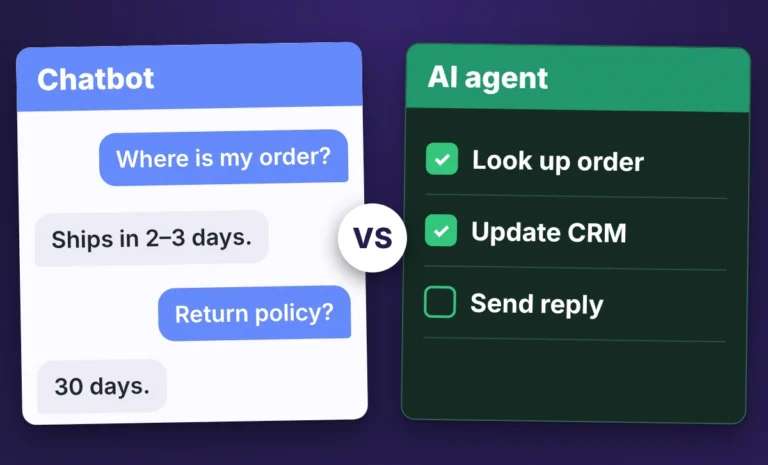
AI workflow automation follows a fixed path you design in advance, while an AI agent chooses its own steps to reach a goal.
In a workflow, a form submission arrives, an LLM summarizes it and the summary lands in Slack.
Every run takes the same steps in the same order.
An agent gets a goal and a set of tools.
The model decides which tool to call, reads the result and picks what to do next.
A lead research agent might search the web, check your CRM, spot a gap and run another search without anyone telling it to.
Most real projects use both: a workflow handles the predictable parts and an agent handles the parts that need judgment.
In short: workflows follow a script, agents make decisions, and a good platform supports both in one build.
What should you look for in an AI workflow builder?
Before comparing names, decide what you need the tool to do.
A good AI workflow builder should offer:
- Native LLM calls to OpenAI and Claude, with control over the prompt, model and temperature
- Tool calling, so an agent can trigger other steps and APIs on its own
- Branching logic that reacts to what the model returns
- Error handling and retries, because LLM calls fail more often than normal API calls
- Enough AI agent integrations to reach your CRM, email, spreadsheets and help desk
- Pricing that does not punish you for running many small steps
In short: judge every platform on LLM control, tool calling, logic, error handling, integrations and cost per run.
Which is better for building AI agents: n8n, Make, or Zapier?
n8n is the best of the three for building AI agents, with Make as the best visual option and Zapier as the simplest.
There is no single best automation tool for AI agents, because each has a clear lane.
n8n suits technical teams that want control.
Make suits visual thinkers who want strong logic without code.
Zapier suits teams that want the shortest path from idea to a working automation.
This AI automation platform comparison comes from what we see when we build client systems, not from vendor marketing pages.
In short: n8n for control, Make for visual logic, Zapier for speed.
Why do so many teams choose n8n for AI agents?
Interest in n8n AI agents has grown fast for a simple reason.
n8n gives you an agent node that connects a chat model, memory and a set of tools on one canvas, so you can see exactly what the agent can do and change it.
You can also drop into JavaScript when a visual node is not enough.
If an API returns messy data, a few lines of code reshape it before it reaches the model.
For LLM workflow automation, that freedom saves real time.
n8n can run on your own server, which helps when you handle sensitive customer data, though someone then has to maintain it.
The tradeoff is the learning curve.
A beginner will find n8n harder to start with than Zapier.
In short: n8n gives you the most control over agents, data and hosting, in exchange for a steeper start.
How does Make handle AI agents?
Make is built around a visual canvas where you drag modules onto a scenario and connect them with lines.
For many people it is the easiest way to see how data moves.
Routers, iterators, aggregators and filters let you split a flow, loop through lists and merge results.
In an n8n vs Make AI comparison on a data-heavy task, Make often feels more natural to non-developers, while n8n pulls ahead when you need custom code.
Make also has modules for the major LLM providers and its own AI agents, so you can build a flow that reads an email, classifies it and routes it to the right team without writing code.
Make counts operations, so a scenario with many loops can use them up quickly.
Check your expected volume against Make’s current pricing before you commit.
In short: Make fits if you want visual building and strong data tools without code.
Where does Zapier fit for AI automation?
Zapier is the tool most people try first.
The interface is simple, the app catalog is huge and you can have a working automation in minutes.
It also includes AI features and agents that work across the apps you already connect, so teams can automate AI workflows without hiring a developer.
The n8n vs Zapier AI question usually comes down to this: Zapier gets you started faster, and n8n lets you go further once your needs grow.
Deep branching, custom data handling and fine control over LLM behavior are harder in Zapier, and per-task pricing can climb with volume.
In short: Zapier is the fastest start and the best option for simple, app-to-app automations.
Can n8n, Make, and Zapier connect to OpenAI and Claude?
Yes. All three connect to OpenAI and Claude from Anthropic, through a built-in connector or a generic HTTP request.
The difference is control.
In n8n you can set the model, system prompt, temperature and tools in detail, and swap providers by changing one node.
Make and Zapier modules are quicker to set up but expose fewer options.
When you need to connect LLMs to APIs that have no ready-made integration, all three accept custom HTTP requests, and n8n lets you pass the response straight into code or an agent tool.
In short: all three connect to OpenAI and Claude, and n8n gives you the most detailed control.
Which platform is best for calling external tools from an AI agent?
n8n is the strongest choice when an agent needs to call external tools, because tools sit on the same canvas as the agent and can be any node, sub-workflow or custom code (see the n8n Tools Agent documentation).
Make and Zapier can also give an AI step access to other apps and actions, but you work within their own module and action catalogs.
Check each platform’s current documentation for support of the Model Context Protocol (MCP), an open standard for connecting AI agents to outside tools.
Zapier MCP, for example, exposes Zapier’s apps to AI tools.
In short: for tool calling, n8n offers the most freedom, Make the clearest visual routing and Zapier the widest ready-made app list.
Can you combine AI agents with conditional logic?
Yes, and you should.
Let the model classify or score something, then use ordinary branches to decide what happens next: if the score is above 80, alert sales, otherwise add the lead to a nurture list.
Fixed rules keep the risky decisions predictable while the model handles the fuzzy ones.
Make’s routers and filters and n8n’s IF and Switch nodes handle this well.
Zapier supports it through paths, with less depth.
In short: use the model for judgment and plain conditional logic for control.
How do these tools handle structured LLM output and errors?
An agent is only useful if its output is predictable.
If a model returns a loose paragraph when your CRM expects clean fields, the workflow breaks.
The usual fix is to ask for JSON and validate it before the next step.
n8n has output parser options and code steps for this.
Make parses JSON with built-in modules and filters.
Zapier uses formatter steps, though complex validation takes more effort.
Error handling matters just as much, because LLM calls time out, hit rate limits and sometimes return nonsense.
Look for automatic retries, fallback paths, alerts that name the broken step and a run history you can inspect.
n8n and Make are strong here (see Make’s error handling overview).
Zapier offers basic error handling and replays, which is enough for simple flows.
In short: ask for structured output, validate it and pick a tool with real retry and fallback options.
How can you automate lead qualification and update a CRM with AI?
Lead qualification is one of the best first AI agent projects, and yes, an AI agent can update a CRM automatically as long as the platform can write to your CRM and you validate the model’s output before it saves.
A typical setup works like this:
- A new lead arrives from a form, an ad or an email.
- An agent researches the company and contact with web search and enrichment tools.
- The model scores the lead against your criteria and writes a short summary.
- The workflow updates your CRM with the score, notes and next step.
- High scorers trigger an alert so a salesperson can act the same day.
n8n is usually the better pick here because the research step needs a real agent loop.
Make works well when the logic is mostly fixed, and Zapier handles a lighter version that scores leads and posts them to the CRM.
In short: the right tool depends on how much reasoning the research step needs.
Which platform is best for customer support automation?
For support, speed and reliability matter more than clever reasoning.
A good setup classifies tickets, drafts replies from your help center and escalates anything unusual to a person.
Zapier connects to most help desks in minutes, so it is a practical start.
Make it better when you route tickets by many rules.
n8n is strongest when the agent must search your knowledge base, check order data through an API and write a grounded reply.
Keep a human approving sensitive replies in every case.
In short: start with Zapier for speed, pick Make for rule-heavy routing and choose n8n when the agent needs to look things up.
Can you build production AI agents without coding?
You can build useful ones, but production is a higher bar than a demo.
Modern no code AI automation tools let a careful non-developer ship a working agent on Make or Zapier for tasks like summarizing, classifying and routing.
Production also needs logging, retries, cost limits and tests against messy real data, and that is where a little code or an experienced builder pays off.
Prototype without code, watch how it behaves for a week and get help for the parts that fail.
Set spending limits with your model provider and use a smaller model for simple steps like classification, which also keeps your stack low-cost.
In short: no code is enough to start, but production needs monitoring, testing and some technical judgment.
What are the limitations of n8n, Make, and Zapier for complex AI automations?
- n8n: a steeper learning curve, and self-hosting means you handle updates, security and uptime.
- Make: operation-based pricing can climb on loop-heavy scenarios, and custom code is more limited.
- Zapier: less control over LLM behavior and deep branching, and per-task pricing can climb with volume.
Pricing and features change often, so confirm current plans on each vendor’s pricing page before you commit.
In short: n8n costs you setup effort, Make costs you operations and Zapier costs you flexibility.
Need help building your first AI agent? Work with Algorithm Zero
Choosing a tool is the easy part.
Designing the workflow, handling edge cases and keeping it running is where most projects stall.
At Algorithm Zero, we build and maintain AI automations for small businesses, from lead qualification to CRM updates and support routing.
Browse our portfolio to see recent projects, then tell us what you want to automate, and we will recommend the right platform and build it with you.
Discuss Your AI Automation Project
So which one should you choose?
- Choose n8n if you want maximum control, plan to build real agents or need self-hosting.
- Choose Make if you like building visually and your workflows are heavy on data.
- Choose Zapier if you want quick results and your automations are simple.
Many teams use two of them, with quick automations in Zapier and the serious agent work in n8n.
If you are still mapping out AI agent workflow automation tools for your team, start with one small project and let the results guide the next choice.
Frequently asked questions
Which platform is best for building AI agents?
n8n is the best platform for most AI agents because it combines an agent node, custom code, tool calling and self-hosting.
Make is better if you prefer visual building without code, and Zapier is better for simple automations.
Can n8n, Make, and Zapier connect to OpenAI?
Yes. All three offer OpenAI integrations and accept custom HTTP requests for anything the built-in modules do not cover.
n8n exposes the most settings, such as model, system prompt, temperature and tools.
Can these platforms integrate with Claude?
Yes. All three can call Claude from Anthropic, through a built-in connector or an HTTP request to the Anthropic API.
In n8n, switching between Claude and OpenAI usually means swapping one node.
What is the difference between AI workflow automation and AI agents?
Workflow automation follows a fixed, predesigned path.
An AI agent receives a goal and tools, then decides its own steps.
Most business systems combine them: workflows for predictable steps, agents for judgment.
Can I combine AI agents with conditional logic?
Yes. Let the model classify or score input, then use branches, routers or IF and Switch nodes to decide what happens next.
This keeps important decisions predictable.
How do these tools handle structured LLM output?
Ask the model for JSON, then validate it before the next step.
n8n uses output parsers and code steps, Make uses JSON modules and filters, and Zapier uses formatter steps.
Validation prevents bad data from reaching your CRM.
How do error handling and retries work in AI workflows?
LLM calls can time out, hit rate limits or return unusable text, so you need automatic retries, fallback paths and alerts that name the failed step.
n8n and Make give you detailed controls.
Zapier offers basic error handling and replays.
How can I automate lead qualification with AI?
Capture the lead, let an agent research the company, have the model score it against your criteria, then write the score and notes to your CRM and alert sales on high scorers.
Validate the output before saving.
Can AI agents update a CRM automatically?
Yes, as long as the platform has a connector or API access to your CRM.
Validate the model’s output first and log every change so mistakes are easy to trace and fix.
Zapier is the fastest start for ticket classification and routing.
Make suits rule-heavy routing.
n8n is best when the agent must search a knowledge base or check order data before replying.
Can I build production AI agents without coding?
You can build useful agents on Make or Zapier without code, but production needs logging, retries, cost limits and testing.
Many teams prototype without code and add technical help for the hard parts.